Originally posted as a thread on X.
I’m building an agentic harness modeled on Elm’s architecture: a strict functional pipeline where untrusted agent code runs in total isolation. Containers felt like the natural security boundary. Apple’s open-source container tool seemed like the ideal foundation. Building and running containers is dead simple (container build . -t my-image, container run -it my-image), but I still spent a chunk of my weekend (re-)discovering what breaks when you try to get graphical output across a real VM boundary on macOS.
What Apple Built
Apple released container as an open-source project on GitHub in mid-2025. It creates and runs Linux containers inside lightweight virtual machines, backed by the Virtualization framework on macOS 26 (Tahoe). Each container is a real VM with its own kernel. The tool is fast, the architecture is clean, and if all you need is headless Linux workloads, it works beautifully.
If you have ever run GUI apps in Docker on Linux, you might remember Jessie Frazelle’s 2015 post where she ran Chrome, Spotify, and Skype in containers by mounting the X11 socket and passing DISPLAY. That worked because Docker on Linux is namespace isolation: the container shares the host’s kernel and display server. On macOS with Apple’s tool, none of that applies. There is no X11 socket to mount. The host is not running X11 at all. You are crossing a VM boundary, and the display pipeline has to be rebuilt from scratch inside the container. That is the gap I’ve rediscovered and am sharing in this article today… at least I didn’t waste all this time for nothing if it helps at least one person (seriously, just one).
The Graphical Interface Problem
As I wrote above, since there is no X11 socket to mount and no shared display server, you need to run the entire display pipeline inside the container. That means a virtual framebuffer, a VNC server, a window manager, and optionally noVNC for browser-based access. It is a lot more infrastructure than on Linux, but it is the only path I could think of that works across a VM boundary.
The Networking Trap
Here is where your Docker muscle memory will betray you. If you have built containers before, your instinct is to pass -p 5901:5901 to expose a port, then connect to localhost:5901. With Apple’s container tool, you do not need port flags at all. Each container gets its own routable IP address on the 192.168.64.x subnet, and every port is directly accessible on that IP. Run container ls to see the address.
That said, if you try to use -p to map ports to localhost anyway, you may hit a known bug where the forwarding accepts connections but returns empty replies. And --publish-socket, as Abdullah Eke documented in his Medium post, expects both arguments to be Unix socket file paths (host_path:container_path), which does not help for services like VNC that listen on TCP. The simplest path is to just use the container’s IP directly.
It took several rounds of debugging to get right, and every failure was instructive… Here is the complete, working setup: a Dockerfile that actually works.
Building and running is the easy part. Apple’s container tool uses familiar syntax:
# Build the image
container build . -t vnc-experiment

# Run it (use -it to see logs, -d to detach)
container run -it vnc-experiment

# In another terminal, find the container's IP
container ls
# Look for the ADDR column, e.g. 192.168.64.6
One pleasant surprise: you do not need any -p port flags. Apple’s container tool gives each container its own routable IP address on the VM subnet, and all ports are accessible on that IP by default. No port mapping, no socket publishing, no socat: just grab the IP from container ls and go. That is actually cleaner than Docker’s model to my taste…
I won’t mention XQuartz as a potential solution… I spent enough time on this today…
The Real Problem: Your Expensive Apple Silicon GPU is Invisible
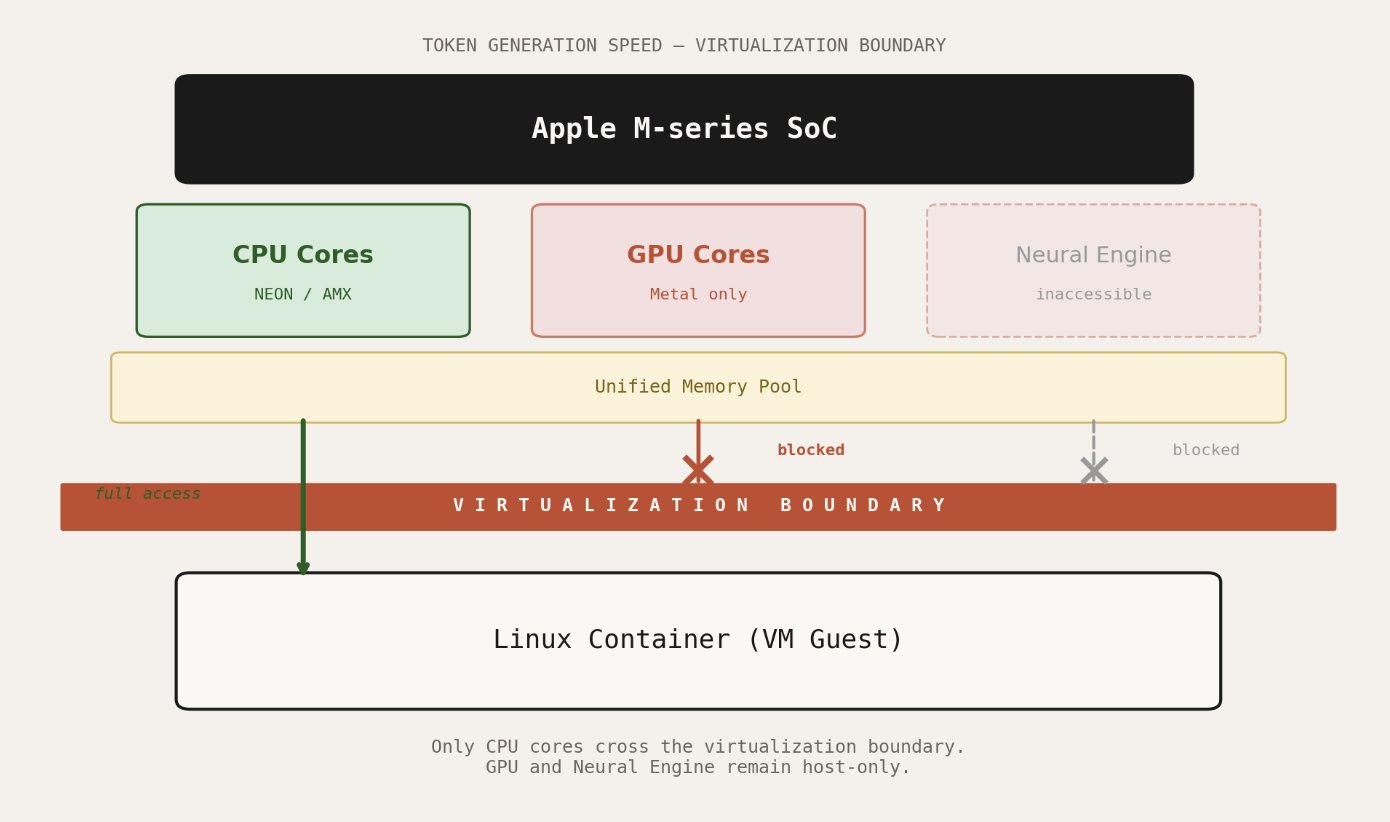
Display forwarding is a solved problem, even if the solutions are inconvenient. The deeper issue is compute. Your M-series chip has a powerful GPU with a unified memory architecture that makes it exceptionally well-suited for machine learning inference (<3 MLX). None of that capability is accessible from inside a container.
Apple’s Virtualization framework does not expose the GPU to Linux guests. There is no Metal passthrough. There is no compromise path.
This is not a container-specific limitation. It applies to every Linux VM on macOS, whether you are using Apple’s tool, Docker, or Podman. The Hypervisor framework provides virtual CPUs and memory. The Virtualization framework sits above it and implements the virtual machine monitor. Neither layer offers GPU device access to the guest operating system.
Mesa, Vulkan, and the Experimental Workaround
There is one experimental path worth knowing about. Sergio Lopez demonstrated a technique using libkrun and krunkit that routes Vulkan API calls from inside a container out to a Vulkan-to-Metal translation layer on the host. The Linux guest runs a patched Mesa Vulkan driver that communicates through virtio-gpu shared memory. On the Mac side, the calls are translated to Metal and executed on the real GPU.
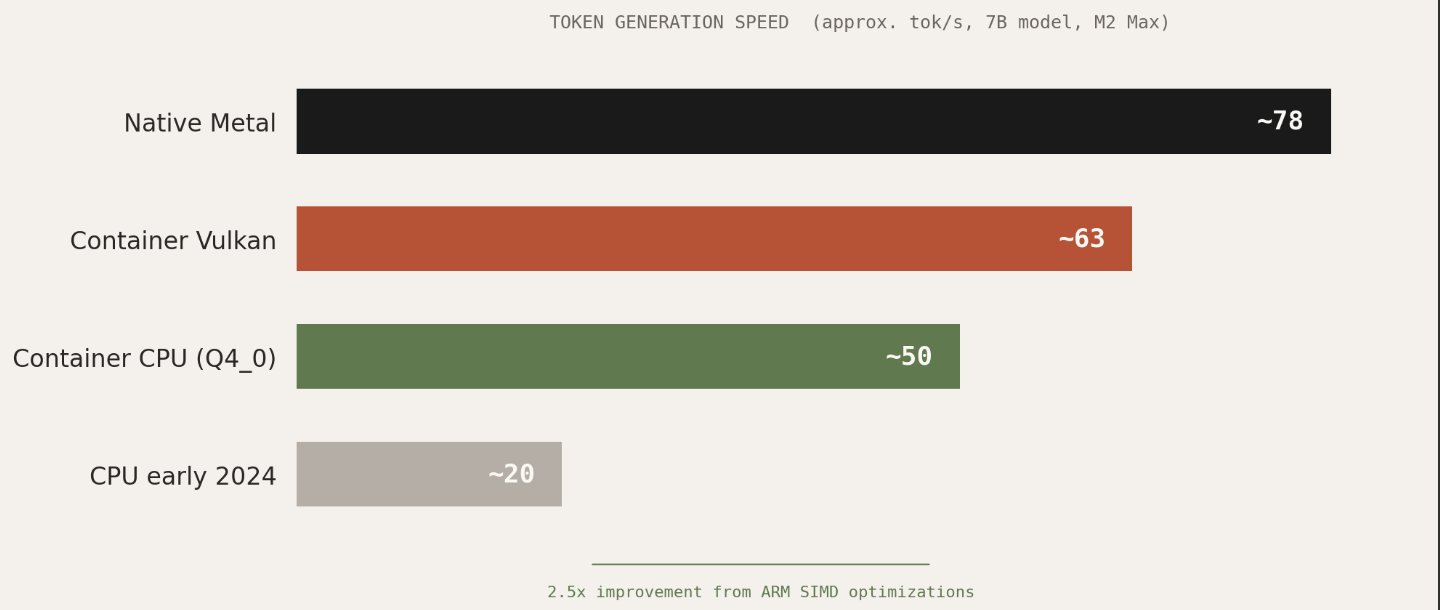
This is clever engineering, but kinda fragile: the patched Mesa driver needs to be maintained against upstream, the technique only works with Podman’s applehv machine provider using krunkit as a drop-in replacement for vfkit, and the performance results are a mixed bag. Testing with Phi-3 on an M2 Max showed roughly 63 tokens per second in a container versus 78 natively. That is respectable, but the author of that work ultimately concluded that optimized CPU inference had caught up to the point where the Vulkan passthrough complexity was not worth it.
Mesa is a great piece of engineering, and I’m impressed by what a small number of amazing contributors can do. Calling it fragile is not a criticism of their effort in any way, it’s mostly a statement about where the investment needs to come from. Apple controls the Virtualization framework. Apple controls Metal. Exposing even basic GPU compute to VM guests is a problem only Apple can solve cleanly.
CPU Inference: The Practical Answer
The silver lining in all of this is that ARM CPU inference has gotten remarkably fast. The llama.cpp project now uses optimized quantization formats like Q4_0_4_4 that take full advantage of NEON and AMX matrix instructions on Apple Silicon. A 7B parameter model runs at usable interactive speeds entirely on CPU, inside a container, with no GPU access whatsoever. Benchmarks from early 2024 to late 2025 show a 2-3x improvement in CPU-only token generation, largely from better use of these instruction sets.
For my agentic harness, the architecture I settled on separates concerns cleanly: the inference engine can run natively on the Mac host with full Metal GPU access. The agent code, the untrusted part that I want sandboxed on top of having Elm-like guarantees (crash-free sort of thing), never touches the GPU directly as it does not need to, it sends requests and receives structured responses.
This works. But it is a workaround for a limitation that should not exist.
What Apple Should Do
The community discussion on the apple/containerization GitHub repository is full of researchers, engineers in robotics (and students), compute companies, and ML engineers making the same request: expose GPU compute through the virtualization layer. The use cases range from LLM inference to ROS 2 simulation to scientific visualization. The hardware is more than capable. The M4+ (Max and Ultra) chips have GPU cores that rival discrete cards for many workloads, paired with unified memory that eliminates the copy overhead that plagues traditional GPU virtualization.
Apple controls every layer of this stack. They build the silicon. They build the Virtualization framework. They build Metal. Exposing a compute-only subset of GPU functionality to VM guests, even without full graphics support, would unlock an enormous amount of value for developers who are already choosing Apple hardware precisely because of its ML capabilities.
Until that happens, the answer is: run your inference on the host, containerize everything else, and accept that the most capable part of your machine is currently (hopefully not forever!) behind a wall that only Apple holds the key to.